
 Introduction and code structure
Hardware implementation
Kinds of messages occuring in MIDI system
Kinds of connections in MIDI
Recording and playback using sequencer
Atypical drivers for MIDI
Synchronization using MIDI
Introduction and code structure
Hardware implementation
Kinds of messages occuring in MIDI system
Kinds of connections in MIDI
Recording and playback using sequencer
Atypical drivers for MIDI
Synchronization using MIDI
Pitch detection methods
|
|
MIDI - Musical Instrument Digital Interface created in 1983.
The MIDI interface is a bidirectional serial asynchronous link, which transfers data at a rate of 31.250 bits per second with a tolerants of plus or minus 1 percent.The information is grouped in bytes. Each byte is enclosed by a start bit and stop bit. The start and stop bits let the reiceving unit identify the begging and end of byte as it comes, bit by bit. In order to obtain 8 bits of useful information , you have to send a group of 10 bits. This 10-bit group is also known as a byte.

Figure 1 Structure of simple byte
These 10-bit MDI bytes are grouped into packets (which can contain any number of bytes from 0 to infinity) according to well-defined syntax status+date, known as MIDI message. Status word, which tell us about type of information, has MSB=1, hovever data byte has MSB=0.
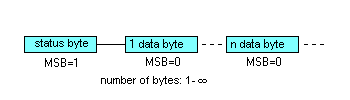
Figure 2 Structure of MIDI code

|
|
Physically, the MIDI standart requires 5-pin, 180-degree DIN connectors (Octave Plateau instruments use Canon XLR sockets, and Lake People uses jacks). A logic voltage of +5V represents a bit set to 0, and a logic voltage of 0V represents a bit set to 1. In any event, MIDI cable should be not longer than 15m. Longer cables can adversely affect the data they carry. Every MIDI devices should have 3 types of ports: an output port - MIDI Out, an input port - MIDI In and a retransmiting port - MIDI Thru. In order to avoid any uncoveted effects, every MIDI Thru port is isolated from each other by optoisolator.
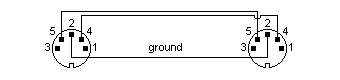
Figure 3 MIDI connection
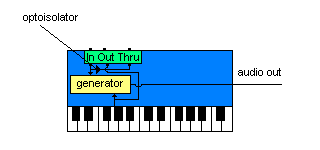
Figure 4 Optoisolator in MIDI Thru port
|
|
- Channel Messages
- Voice Messages
- Mode Messages
- System Messages
- System Common Messages
- Real-Time Messages
- System Exclusive
|
|
The simplest
link between two MIDI devices, MIDI A and MIDI B, takes the form of a one-way
link: from A to B or from B to A. By connecting the MIDI Out port of synthesizer
A to the MIDI In port of synthetizer B, synthetizer B will respond aotomatically
to keys pressed on the keyboard of synthetizer A. In this case only one
wire is needed. Exactly in the same way, you can connect MIDI device with
sound module. This link lets us too:
- change parameters between devices which describe sounds
- transmit
PCM samples
- transmit
files
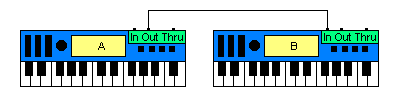
Figure 5 The simplest link: MIDI Out - MIDI In
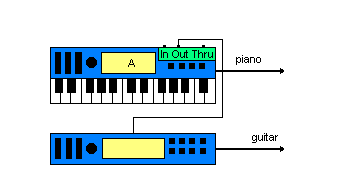
Figure 6 Control of sound module
By connecting two devices from A to B and from B to A you get a bidirectional link that uses two wires. This type of connection is known as a handshake link. In addition to having the option of controlling synthetizer B from synthetizer A and synthetizer A from synthetizer B, you can also carry on dialogue - type exchanges.
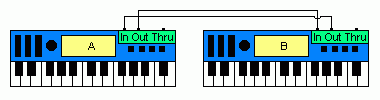
Figure 7 The handshake link
When we want to create a link more than two devices we have to use MIDI Thru port. MIdi Thru port retransmits MIDI codes that are received by MIDI In port. The codes received by the MIDI In port are "photocopied" and sent immediately to the MIDI Thru port. The number of devices connected this way is theoretically unlimited. The average delay in every devices is about 2 milisecond, depending on response time of the optoisolators. On the other hand, the leading and trailing edges of the signal have a strong tendency to break down and become munged beyond recognition - a state that makes for faulty interpretations of MIDI messages. This way it is advisable for a daisy - chain link not to contain more than three instruments.
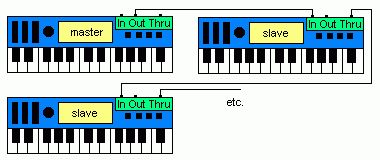
Figure 8 A daisy - chain link using MIDI Thru port

Figure 9 Breakdown of the quality of signal
The MIDI Thru box is an alternative to the daisy - chain link. It consists of a MIDI In port and several MIDI Thru ports. Incoming signals are duplicated as many times as there are MIDI Thru ports in the box. This technique prevents the breakedown of the signals, simplifies connections, and frees the MIDI Thru ports on the linked instruments for the addition of more more daisy - chained devices. In the same way you can control sound modules.
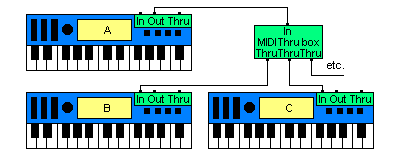
Figure 10 Using MIDI Thru box
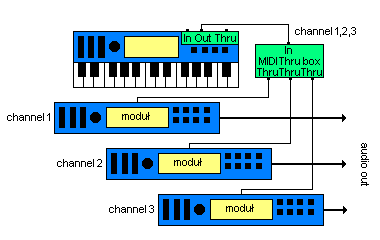
Figure 11 Using couple of sound modules
In case, you want to drive an instrument C simultaneously from two other instruments, A and B. To do so, you have to mix (merge) the signal from the MIDI Out ports of instruments A and B in order to send them to the MIDI In port of instrument C. If two messages from instruments A and B arrive at the input of the merger at the same time, then the merger has to give priority to one message or the other, making the non-priority message wait while the first message is sent.
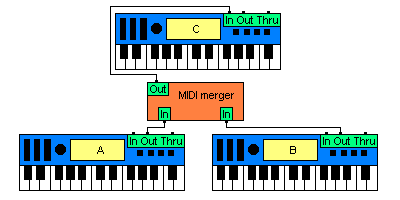
Figure 12 Using MIDI Merger
|
|
Sequencer is a device which enable to record and play MIDI code. This recorded code can be modified, it means editited. Edition consists of: changing tempo, changing pitch, etc. Below are shown two main principles of using sequencer (recording, playback).
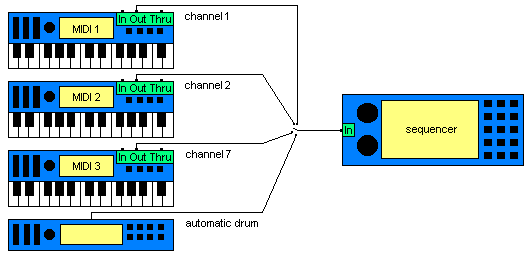
Figure 13 Recording with sequencer
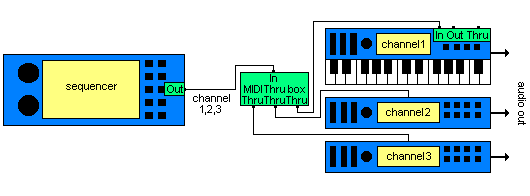
Figure 14 Playing with sequencer
|
|
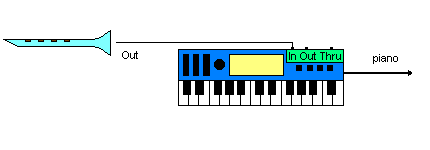
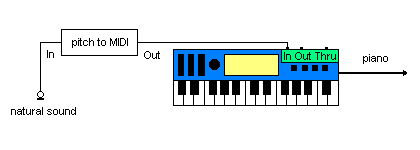
Figure 15 Driving MIDI devices with any natural sound source
|
|
In most studios synchronization network is based on MIDI. Using special messages we can drive multitracks, consoles, other devices. One key can start process of recording or playing tracks. All we need is synchronizator MIDI to SMPTE code.
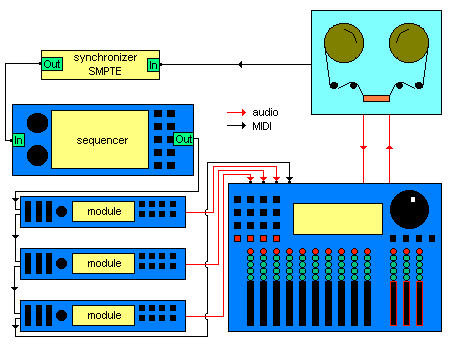
Figure 16 Example of synchronization in studio
Piotr Synak